cPanel vs DirectAdmin vs Plesk: Cost and Features for India
When an Indian agency compares cPanel, DirectAdmin and Plesk, the monthly licence card is only the beginning. Staff familiarity, customer logins, email migration and application compatibility can cost more than the difference between two subscriptions. A cheaper panel is not cheaper if moving it breaks client mail or creates weeks of avoidable support work.
This comparison focuses on choosing an appropriate panel and budgeting honestly. cPanel and DirectAdmin are Linux hosting panels; Plesk has Linux and Windows offerings. The operating system, edition and account model matter before price. We explain how to compare those details and how to migrate cautiously, without reproducing installer sources, licence activation commands or private account information.
In this guide
- Which hosting panel should you choose?
- How should you compare panel prices in India?
- What counts as an account or domain?
- Why should licence terms come before the lowest price?
- Which panel fits an agency, reseller or Windows site?
- Step 1: Inventory and back up before switching panels
- Step 2: Build a separate supported destination
- Step 3: Test websites, mail and ownership before DNS cutover
- Frequently asked questions
Which hosting panel should you choose?
Choose cPanel/WHM when your Linux hosting operation and customers already depend on its workflow and integrations. Consider DirectAdmin when its Linux administration model and ecosystem fit the work your team needs to do. Consider Plesk when the required Linux or Windows application stack and edition support match your use case. No single panel wins every workload.
Start with a list of required functions: separate customer accounts, reseller permissions, DNS, mailboxes, supported PHP versions, application tools and restoration options. Then verify that the exact edition includes them. A panel that can manage one administrator’s domains is not automatically the right edition for reselling hosting. Do not compare a small entry tier with a multi-customer hosting tier as if they were identical.
How should you compare panel prices in India?
Use the same billing cycle, server type and account requirement for every quotation. Distinguish vendor retail subscriptions from ShoHost shared licences: these are different purchasing arrangements and should not appear in a table as equivalent entitlements. ShoHost is not described here as the software vendor or affiliated with it. Ask what terms and support apply before buying.
INR payment for licences is owner-confirmed. That does not establish a fixed exchange rate or a final rupee invoice from an old dollar price. This guide deliberately avoids numerical totals that could not be checked in the live cart. Review the final total due, all fees included, for your selected configuration. Third-party shared licences are non-refundable. Check renewal terms directly rather than assuming the first visible card settles the whole contract.
What counts as an account or domain?
A domain is not the same unit as a separate hosting account. One customer’s login may control more than one domain, while another customer needs isolation even for a single website. When building your comparison sheet, record customer logins and domains in separate columns. Also record reseller requirements, because a reseller layer can change which edition you need.
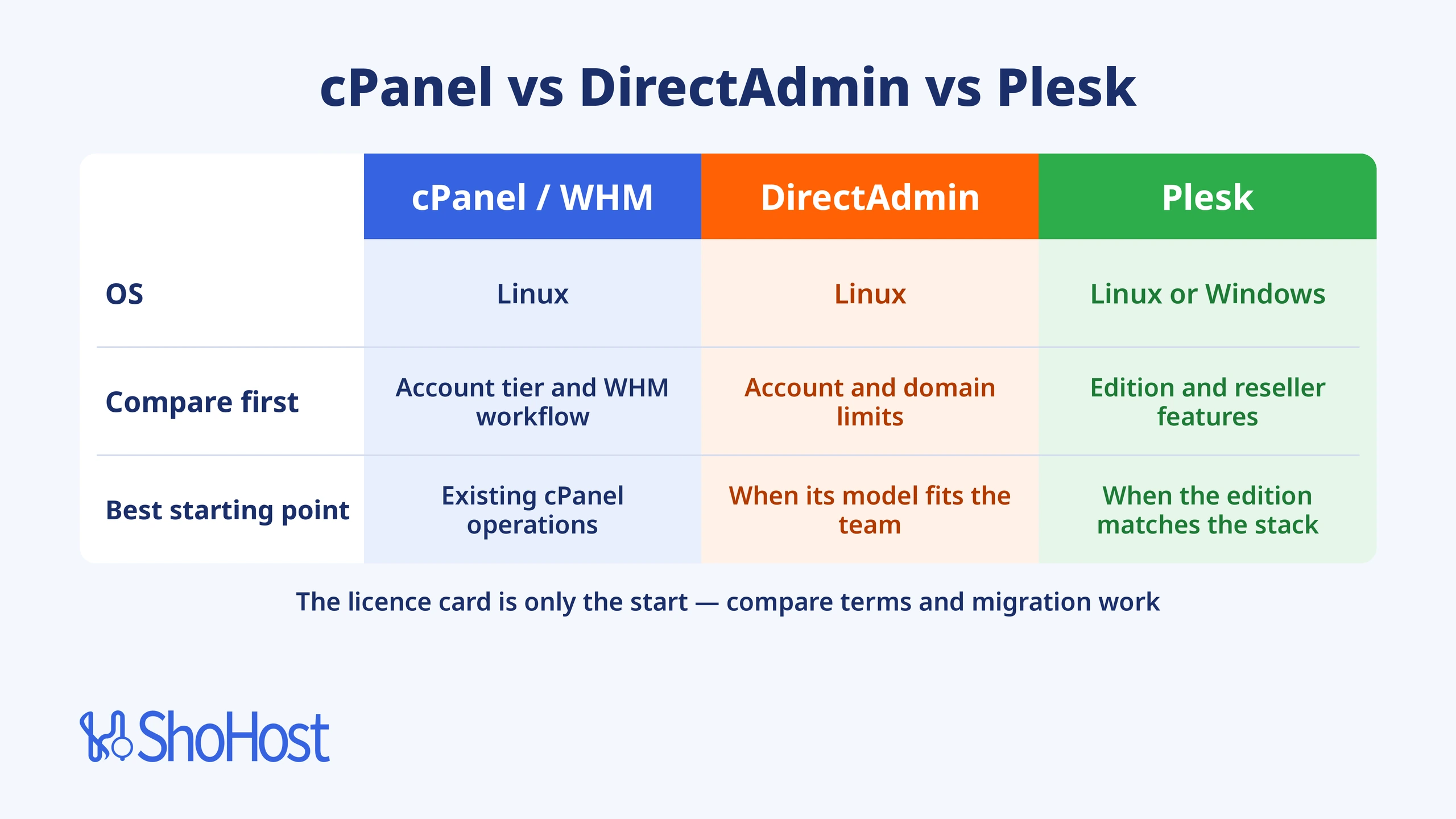
cPanel combines customer cPanel accounts with the WHM administration layer. DirectAdmin has administrator, reseller and user roles, with limits varying by licence offering. Plesk has different editions for different workloads. Its current edition overview describes Web Admin for basic domains, Web Pro for more extensive website management and Web Host for hosting businesses. Check the specific edition rather than assuming all editions expose the same reseller features.
| Panel | Operating-system scope | Compare before choosing |
|---|---|---|
| cPanel/WHM | Linux | Account tier, WHM workflow and integrations |
| DirectAdmin | Linux | Account/domain limits, roles and licence terms |
| Plesk | Linux or Windows offering | Edition, domain allowance and reseller features |
Why should licence terms come before the lowest price?
A label on a seller’s card is not evidence that every proposed use is permitted by the software vendor. Read the applicable licensing terms and ask questions if a standalone licence offer differs from the vendor’s stated model. This matters when you run business-critical customer websites: predictable maintenance and a clear support path belong in the purchasing decision.
DirectAdmin’s public pricing page currently states restrictions on standalone licence reselling and describes a server-provider arrangement that includes a server. Confirm that any intended DirectAdmin purchasing arrangement meets those terms before proceeding. This guide does not recommend bypassing them. For any panel, reject requests to modify licensing files or install an undocumented activation mechanism. A price comparison should help you choose sustainable software use, not hide an entitlement problem.
Which panel fits an agency, reseller or Windows site?
For an established cPanel agency, the cost of retraining and migration may outweigh a lower subscription elsewhere. For a new Linux operation, evaluate DirectAdmin and cPanel with a realistic test account rather than relying on interface screenshots. For an application that needs a supported Windows stack, investigate the corresponding Plesk offering; a Linux-only panel cannot turn a Linux host into a Windows application server.
For resellers, test package creation, account ownership, suspension, backups and delegated access. For a single business website, a managed hosting plan may avoid running a panel server yourself. Compare the administrator time involved, not just the software line. Your hosting platform, operating system and applications should lead the decision. A control-panel brand is not a substitute for a backup policy or competent system administration.
| Time | Difficulty | Risk | Downtime |
|---|---|---|---|
| Allow setup, testing and recovery time; depends on host | Administrator-led | High for server changes; lower for read-only checks | Maintenance window for service changes; no fixed duration |
Step 1: Inventory and back up before switching panels
List every account, domain, mailbox, database, scheduled task, certificate and application runtime. Identify unusual features such as custom mail routing or background workers. Take restorable backups and retain an independent copy outside the source server. Exporting a database is useful, but it does not capture mailbox contents or all hosting configuration.
Choose a small, non-critical account for the first migration. Define how you will validate it and who can approve the later customer cutover. Keep the old service available until the destination is tested. Do not cancel the source server because the first homepage looks right. For Indian customers, schedule changes around actual business operations, including order handling and accountant access, not simply the administrator’s preferred hour.
Step 2: Build a separate supported destination
Install the destination panel on a fresh server that meets its current requirements, using a qualified administrator and current vendor documentation. Do not stack multiple hosting panels on the same production operating system. Confirm software entitlements and ordinary panel access before importing customer data. No installer sources or activation commands are included in this guide.
Use a supported migration tool where it handles the source and destination combination. A tool may move websites successfully while leaving application-specific settings to you. Read its exclusions. If no supported automated path covers the workload, plan a manual application-level migration rather than assuming a full account archive is portable. Document the destination PHP, database and mail settings so you can investigate differences systematically.
Step 3: Test websites, mail and ownership before DNS cutover
Verify the destination using a safe preview method, then test login, forms, database writes, file uploads, scheduled tasks and outgoing mail. Check account ownership and permissions as well as the public page. A shop that displays products but cannot complete a test order is not ready for customer traffic. Preserve any new data created during the transition.
Only update DNS through your normal approved change process after the tests pass. Keep a rollback plan that accounts for data written to the new server; moving DNS back does not merge databases. After cutover, monitor delivery, errors and customer reports. If the old and new servers both receive mail during the transition, reconcile that mail before retiring the source. Migration success means the complete business workflow works, not only that the panel login loads.
Frequently asked questions
Which is cheapest?
That depends on edition, account limits, billing cycle and the purchasing arrangement. Compare final checkout totals for genuinely equivalent requirements.
Can I pay in rupees?
Yes. INR payment for ShoHost licences is owner-confirmed. Use the actual live invoice rather than an estimated currency conversion.
Does Plesk support Windows?
Plesk has Windows and Linux offerings. Check that the selected operating system and edition support your application requirements.
Can I install another panel over cPanel?
Use a fresh supported destination. Installing another panel over a live cPanel server risks conflicting services and configuration.
Does every Plesk edition include reseller management?
Do not assume so. Check the current edition matrix and select an offering intended for your hosting business requirements.
Are shared licences refundable?
No. Third-party shared licences are non-refundable. Confirm compatibility, entitlements and the applicable terms before purchasing.
Choose the right service before paying
Review the ShoHost cPanel shared licence for the intended setup. Confirm compatibility and the selected billing cycle, then review the final total due, all fees included, in checkout. No estimated currency conversion is quoted here.
For service questions, contact support@shohost.com or WhatsApp +91 94880 91432, 9 AM to 12 midnight IST. Use a private support conversation and share only the information needed to investigate; never publish passwords, licence secrets or customer data.
Related guides
cPanel License Price in 2026: What It Really Costs (and How to Pay Less) · DirectAdmin Pricing vs cPanel in 2026: Which Licence Costs Less? · Plesk vs cPanel Licence Cost in 2026: Real Prices Compared
Documentation and scope
Technical guidance is based on the linked documentation and this article’s stated scope. Recheck current compatibility before making server changes. Product terms and live checkout details take precedence over an old price card.