

Cheap WordPress Hosting in India (2026): What ₹30 to ₹150 a Month Really Gets You
If you’re starting a WordPress website in India, the first thing you’ll notice is how cheap hosting looks. Plans advertised at ₹49, ₹69 or even less are everywhere. The catch is that the price on the banner is rarely the whole story. Some cheap plans are genuinely good value, and others become expensive at renewal or slow your site down just when it starts getting visitors.
This guide explains what WordPress actually needs in 2026, where the hidden costs are, and which features you shouldn’t give up to save a few rupees. By the end, you’ll know how to pick a budget plan you won’t regret.
What WordPress Actually Needs in 2026
WordPress isn’t demanding, but it does have a few minimum requirements. WordPress.org currently recommends PHP 8.3 or newer, MySQL 8.0+ or MariaDB 10.6+, and HTTPS support. If a host is still running PHP 7.4, treat that as a red flag. That version is past its end of life and no longer gets security fixes (source).

Memory matters too. Plan for at least 256 MB of PHP memory for a normal blog or business site, and around 512 MB if you run WooCommerce, because online stores do more work on every page load. A free SSL certificate is now essential. Browsers flag sites without one as “Not secure”, and Google prefers HTTPS pages.
The good news is that a well-configured cheap plan can meet every one of these requirements. Many expensive plans simply charge more for the same basics.
Promo Price vs Renewal Price: The Hidden Cost
Entry-level WordPress hosting in India usually costs between ₹49 and ₹149 a month on promotional pricing (source). That’s the price for your first term, though, and it often isn’t what you’ll pay afterwards.
Here’s an example. At the time of writing, Hostinger India lists introductory WordPress prices of about ₹69 to ₹149 a month, renewing at roughly ₹289 to ₹449 a month (source). MilesWeb, also at the time of writing, advertises ₹69 a month with the same price at renewal (source). Two plans that look almost identical on day one can cost very different amounts by year two.
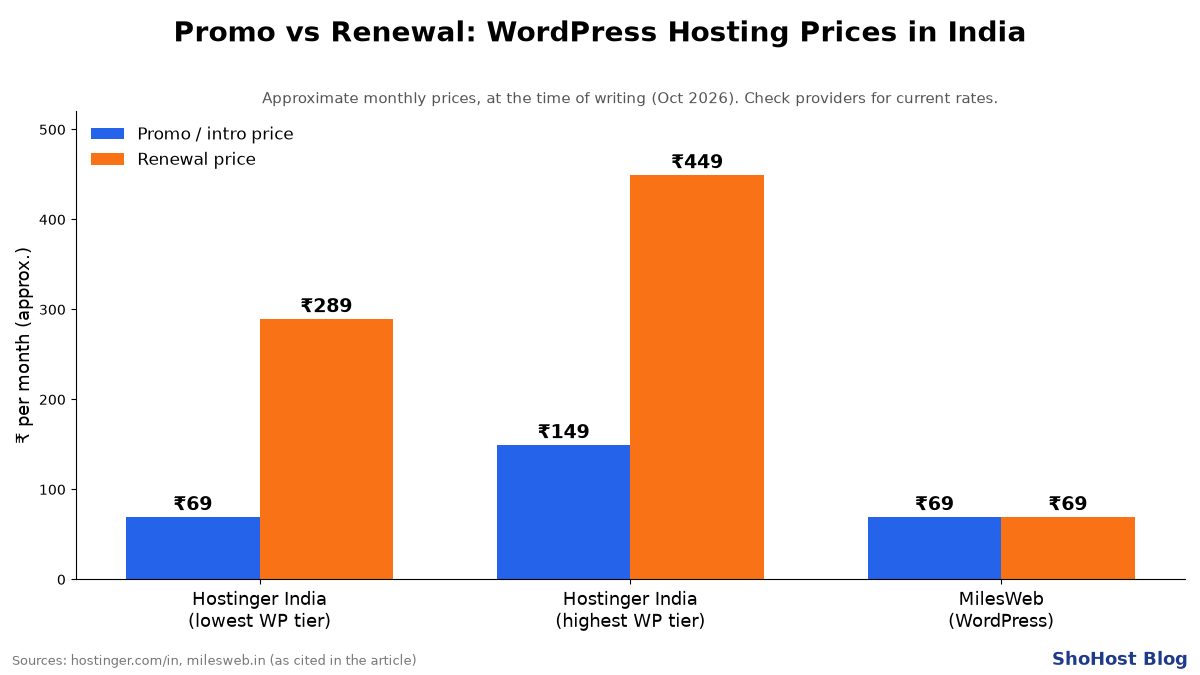
Before you pay, always check two numbers: the price you pay today and the price you’ll pay when the plan renews. Also note how long you have to commit to get the advertised rate. A headline price that only applies if you prepay for four years isn’t really a monthly price.
Features You Shouldn’t Skip: NVMe, LiteSpeed, Backups, SSL and Migration
Cheap hosting doesn’t have to mean slow hosting. A few features make a big difference to speed and peace of mind, and none of them should be paid extras.

- NVMe storage. NVMe drives are much faster than older SSD and HDD storage, so pages and your dashboard load more quickly.
- LiteSpeed web server with LSCache. LiteSpeed plus its free WordPress caching plugin is one of the easiest ways to make a budget site feel fast (source).
- Free SSL. You shouldn’t have to pay for the padlock in the address bar.
- Regular backups. Find out how often backups run and how easy it is to restore one. One bad plugin update can break a site.
- Choice of PHP version. Being able to choose the PHP version for each site lets you stay current and safe.
- Free migration. If you already have a site somewhere else, a host that moves it for you saves hours of work and stress.
Shared Hosting vs Managed WordPress Hosting: Who Needs Which?
Shared hosting puts your website on a server alongside other customers’ sites. It’s the most affordable option and it’s perfectly fine for blogs, portfolios, local business sites and new projects. With a good host using LiteSpeed and NVMe, a shared plan can handle steady daily traffic comfortably.
Managed WordPress hosting adds services like automatic updates, staging sites and WordPress-specific support, and usually costs more. It makes sense for busy online stores, sites that earn real revenue every hour, or owners who don’t want to touch anything technical.
For most beginners, the smart move is to start with a quality shared plan and upgrade when traffic or sales actually need it. Just make sure your host lets you upgrade without moving providers.
A 10-Point Checklist Before You Buy
- Does it support PHP 8.3 or newer?
- Does it use MySQL 8.0+ or MariaDB 10.6+?
- Is free SSL included on every site?
- Is the storage NVMe?
- Does it run LiteSpeed, or offer similar caching?
- How often do backups run, and can you restore one yourself?
- What is the renewal price, not just the promo price?
- Is website migration free?
- When is support available, and how do you reach it?
- Can you upgrade to a bigger plan easily later?
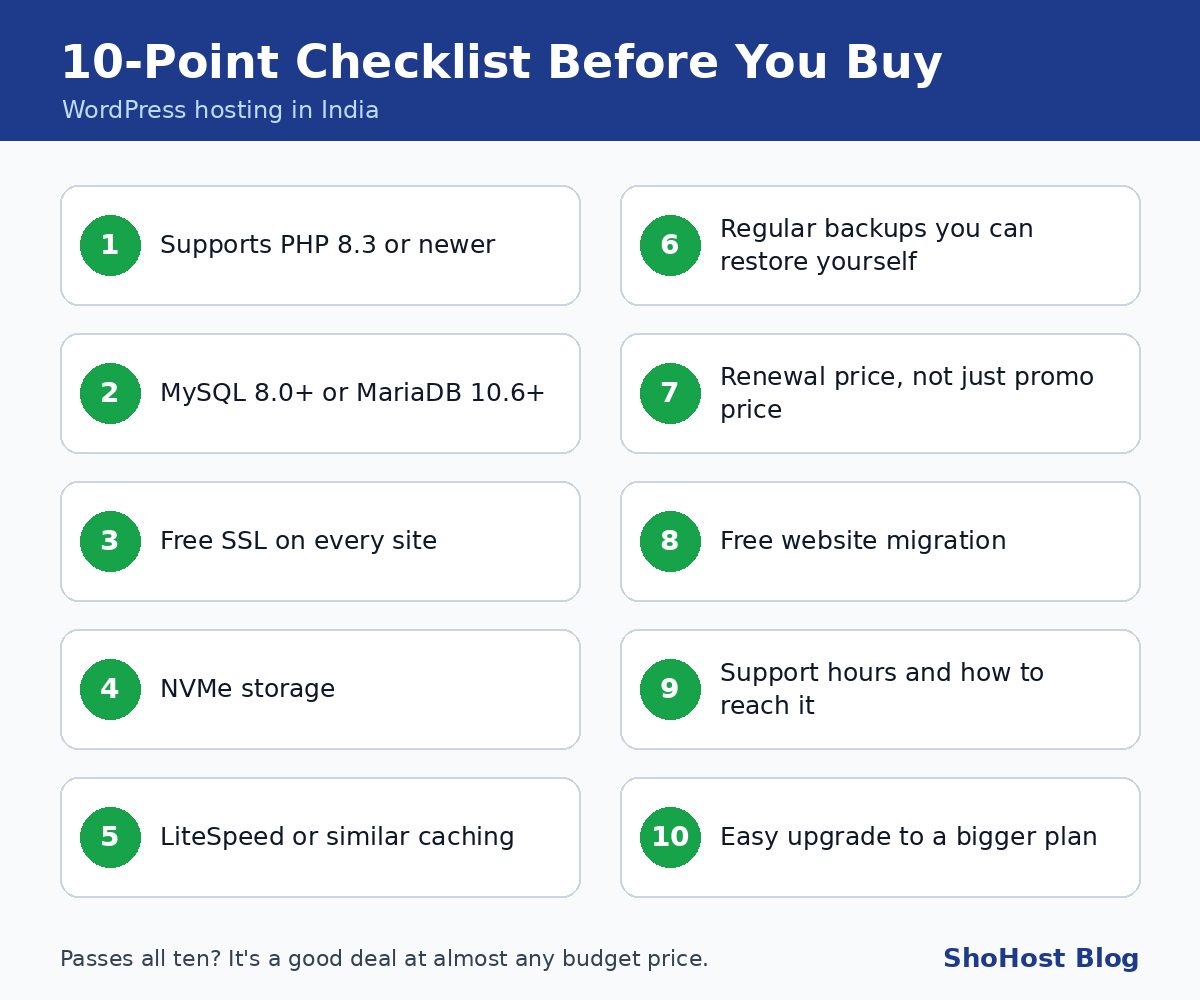
If a plan passes all ten, it’s a good deal at almost any price in the budget range.
How ShoHost Plans Compare
We built ShoHost plans around that checklist, so you get the important features without paying for extras you don’t need:
- CH-1, ₹30 a month: 5 GB NVMe storage for 1 website. Ideal for a first blog, portfolio or small business site.
- CH-2, ₹80 a month: 50 GB NVMe storage for up to 3 websites. Great if you run a few projects or manage sites for clients.
- CH-3, ₹299 a month: unlimited websites, for growing businesses and agencies.
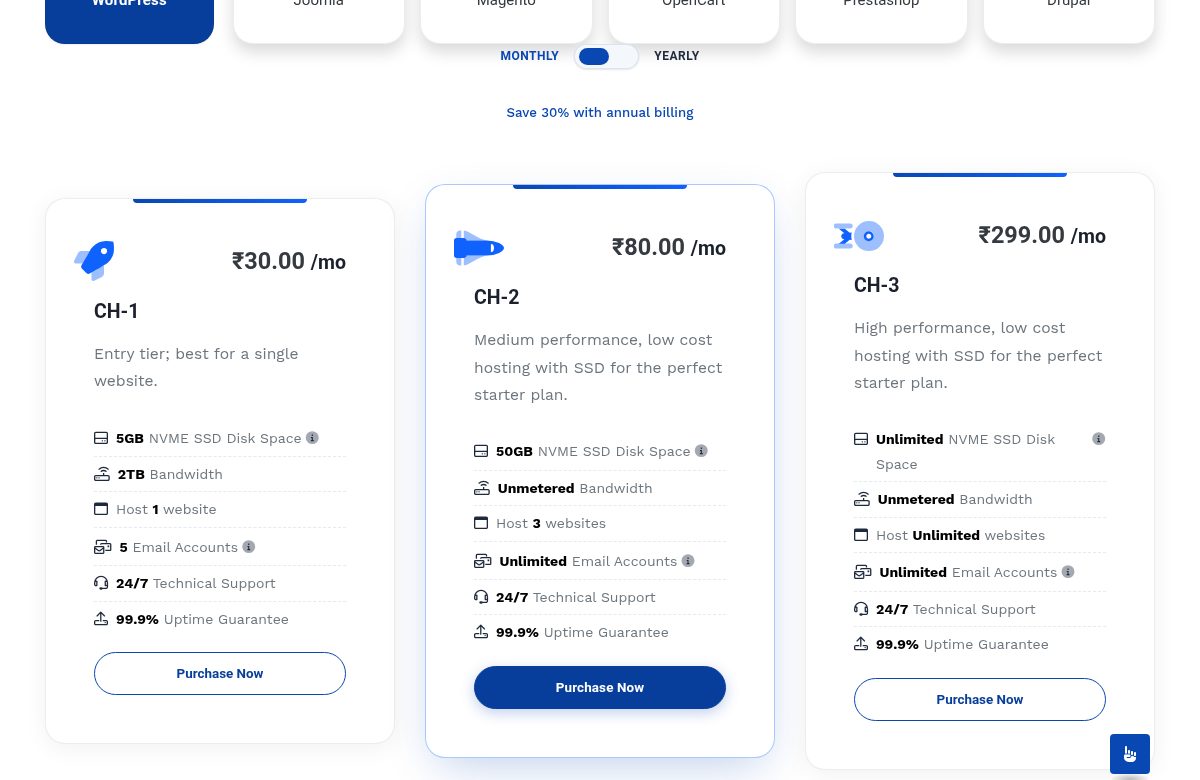
Every plan includes LiteSpeed for speed, free SSL, free website migration (for eligible accounts) and friendly support on WhatsApp. That means you can message a real person when something goes wrong instead of waiting on a ticket queue. You can also start small and upgrade as you grow.
Frequently Asked Questions
Is ₹30 hosting enough for WordPress?
Yes, for a single blog, portfolio or small business site. What matters is whether the plan meets WordPress’s requirements (a current PHP version, a modern database and SSL) and runs on fast hardware. The price alone doesn’t tell you that.
Will my site be slow on cheap hosting?
Not if the host uses NVMe storage and LiteSpeed caching. Most slow WordPress sites are caused by old server software, overcrowded servers, heavy themes or too many plugins, not by a low price. Keep your theme light and turn on caching, and a budget site can load quickly.
Can I upgrade later?
With ShoHost, yes. You can move from CH-1 to CH-2 or CH-3 when you add more sites or need more space, without moving your website to another provider.
Start Your WordPress Site the Smart Way
Cheap WordPress hosting in India can be excellent value as long as you look past the banner price. Check the renewal price, insist on modern PHP, NVMe and SSL, and pick a host that will answer when you need help.
Ready to launch? See ShoHost plans from ₹30 a month, with free SSL, LiteSpeed speed and free migration included.