Dedicated Server in India with a Residential IP: Uses and Checks
Some jobs work fine from any server. Others keep hitting CAPTCHAs, extra login checks or outright blocks the moment they run from a data centre address. That’s why people in India search for a dedicated server with a residential IP: you get a whole physical machine, but its address looks like an ordinary home connection instead of a hosting company. This guide explains what a residential IP is, where it actually helps, where it doesn’t, and what to check before you pay for any dedicated server. We’ll finish with ShoHost’s Intel Server, which the store lists as a dedicated server in India with a residential IP address.
In this guide
- What is a residential IP address?
- Residential IP vs datacenter IP
- Why use a dedicated server with a residential IP?
- When you don’t need a residential IP
- What to check before you buy a dedicated server in India
- ShoHost Intel Server: specs and price in India
- How to order the ShoHost Intel Server
- Frequently asked questions
What is a residential IP address?
Every IP address is registered to a network. Lookup services sort those networks into types. IPinfo, for example, labels each network (its ASN) as ISP, hosting, business, education or government, and flags addresses that belong to hosting, cloud or data centre ranges. A residential IP is one that comes from a consumer internet provider, the same kind of address your home broadband gets. A datacenter IP is registered to a hosting or cloud company.
Websites read that label. As Windscribe’s support team put it on Reddit, sites heavily favour residential addresses because they usually belong to one household, while anyone can rent a data centre server and run anything from it. So the same request can sail through from a home IP and get a CAPTCHA from a server IP.
Residential IP vs datacenter IP
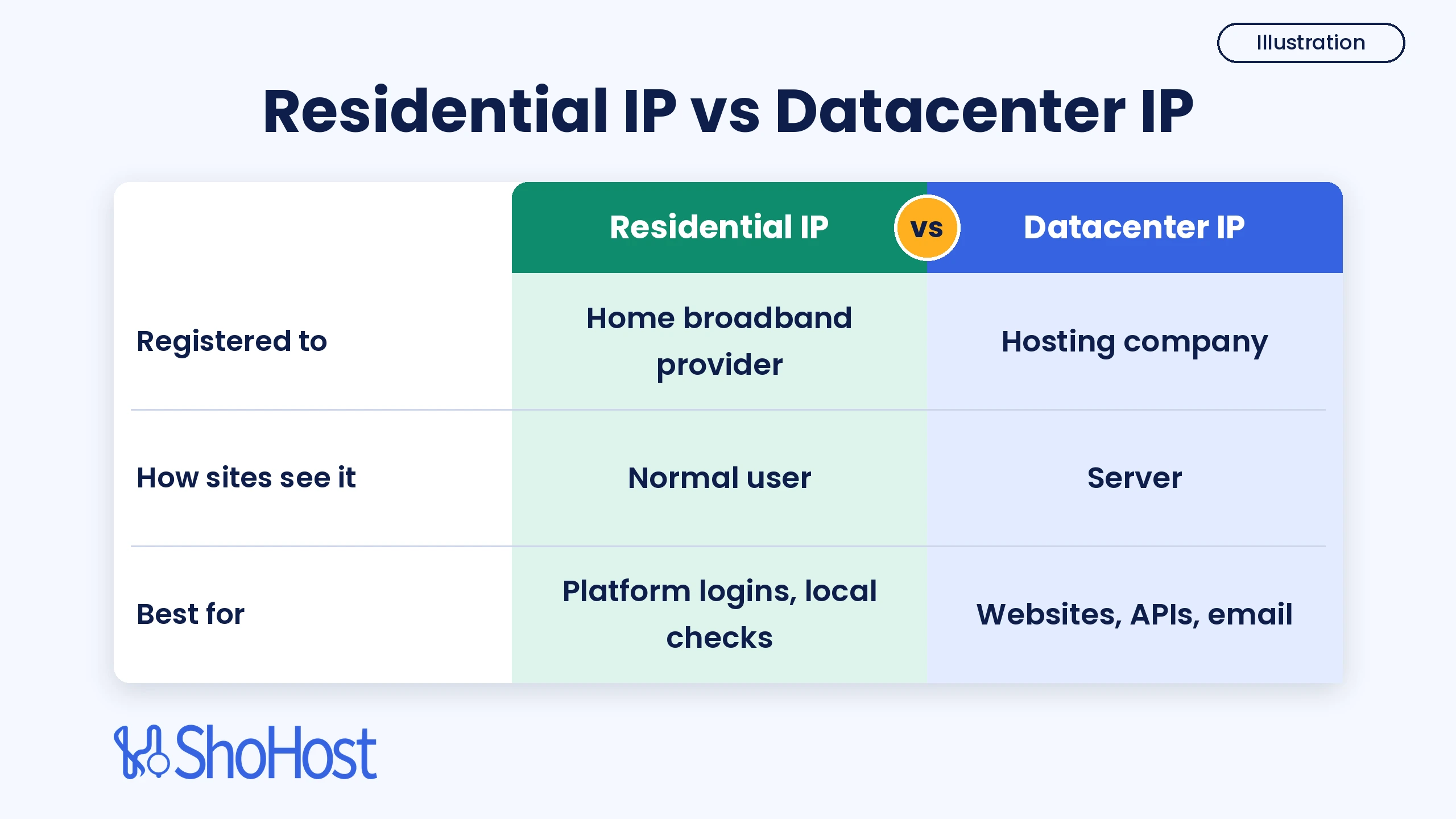
Neither type is better across the board. Here’s how they compare, based on ipaddress.rocks, Firecrawl’s proxy glossary and server owners’ reports on Reddit:
| Residential IP | Datacenter IP | |
|---|---|---|
| Registered to | A consumer internet provider | A hosting or cloud company |
| How sites treat it | Looks like a normal user, fewer CAPTCHAs and blocks | Easier to spot; some sites challenge or block whole ranges |
| Best for | Logins, platform dashboards, local checks that flag servers | Websites, APIs, email, bulk jobs where speed matters |
| Trade-off | Usually costs more; speed and routing follow the provider’s network | Cheap and fast, but lower trust on strict platforms |
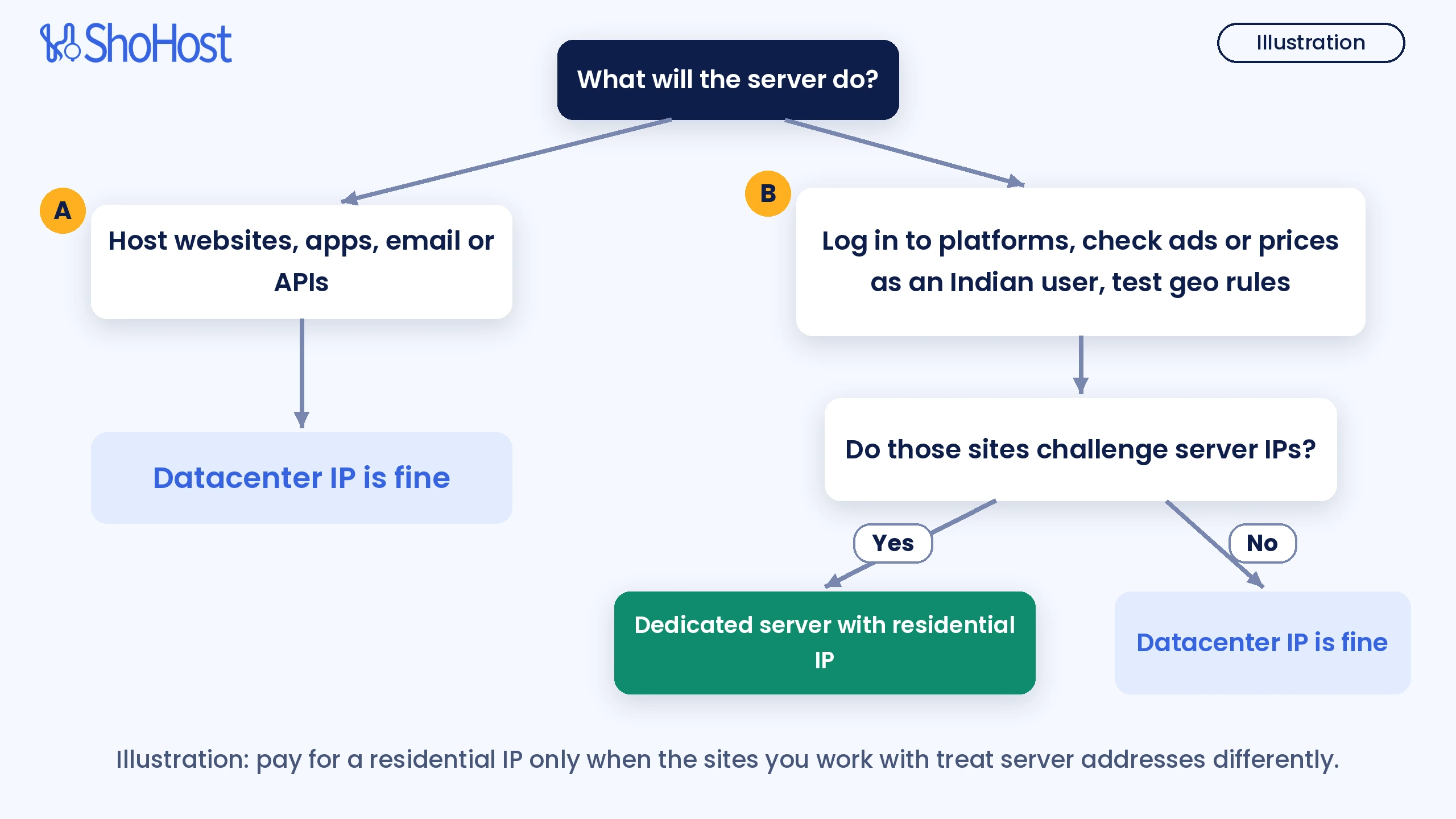
Illustration in words:
- Hosting websites, apps, email or APIs: a normal datacenter IP is fine.
- Logging in to platforms, checking ads or prices as an Indian user, or testing geo rules: ask whether those sites challenge server IPs.
- If they do, a dedicated server with a residential IP makes sense. If they don’t, save the money.
Why use a dedicated server with a residential IP?
Liquid Web and IPFLY list the same jobs where a residential address earns its price. For Indian businesses, the common ones are:
- Running platform dashboards from one stable address. Seller panels, ad accounts and social tools often add extra checks when a login comes from a hosting range. A home-type IP that stays the same between sessions keeps the login pattern steady.
- Seeing what Indian users see. Ad verification, local search rank checks and price monitoring are only accurate if the site treats you like a normal visitor in India.
- Testing your own app’s geo and fraud rules. If your product treats Indian home users differently, you need an Indian home-type address to test that path.
- Automation that needs a full machine. Browsers, bots and schedulers running all day need real CPU and RAM, not a laptop that sleeps.
A dedicated server adds what a proxy can’t: the whole machine and full control over the software. Use it within each platform’s terms of service. A residential label doesn’t make spam or abuse acceptable, and platforms still track behaviour.
When you don’t need a residential IP
Be honest about the job before you pay for it. A Reddit thread comparing residential and regular servers came to a clear conclusion: residential IPs help on sites that flag data centre traffic, but for normal hosting a regular server is faster and simpler. A Hosting Discussion thread adds a warning about long-term setups: check how stable the connection is and how long the IP stays assigned to you.
If you’re hosting WordPress sites, running a database, an API or n8n workflows, a datacenter address is the right tool. ShoHost’s KVM virtual dedicated servers or the Intel 2xCPU servers fit those jobs better. Our guide on when to move to a KVM virtual dedicated server helps you size them.
What to check before you buy a dedicated server in India
GigeNET’s 2026 buyer’s guide, Liquid Web and Worldstream all push the same idea: buy on facts the provider can state, not on marketing words. Use this checklist on any offer, ours included.
1. The IP type, verified
Don’t take the word “residential” on trust. Look the address up and read which network it belongs to. IPinfo’s free lookup returns the network owner. Here’s a real lookup of Google’s public DNS address, a classic datacenter IP:
curl -s https://ipinfo.io/8.8.8.8/orgAS15169 Google LLCExpected result: one line with the ASN and the owner’s name. A hosting or cloud company name means a datacenter IP. A consumer broadband provider’s name means a residential IP. Also ask the provider whether the IP stays the same for your whole term. Once your server is live, run the same check from the server itself to see its own address:
curl -s https://ipinfo.io/org2. The exact CPU model and its age
A spec sheet should name the processor, not just “6 cores”. Then look it up. The Intel Xeon X5650 in ShoHost’s Intel Server is a 6-core, 12-thread chip from Intel’s 2010 Westmere range with 2.66 GHz base and 3.06 GHz turbo speeds. Intel lists it as discontinued. That’s why it’s priced as an entry server: plenty of threads for browsers, bots and schedulers, but not the pick for heavy number crunching. For newer chips, look at the Dual Xeon E5-2680 v4 or a custom build.
3. ECC RAM
GigeNET’s advice is blunt: get ECC memory. It corrects single-bit errors and logs them, so a failing stick shows up before it corrupts data. The X5650 supports ECC, and the Intel Server ships with 16 GB of DDR3 ECC RAM.
4. Disks and growth room
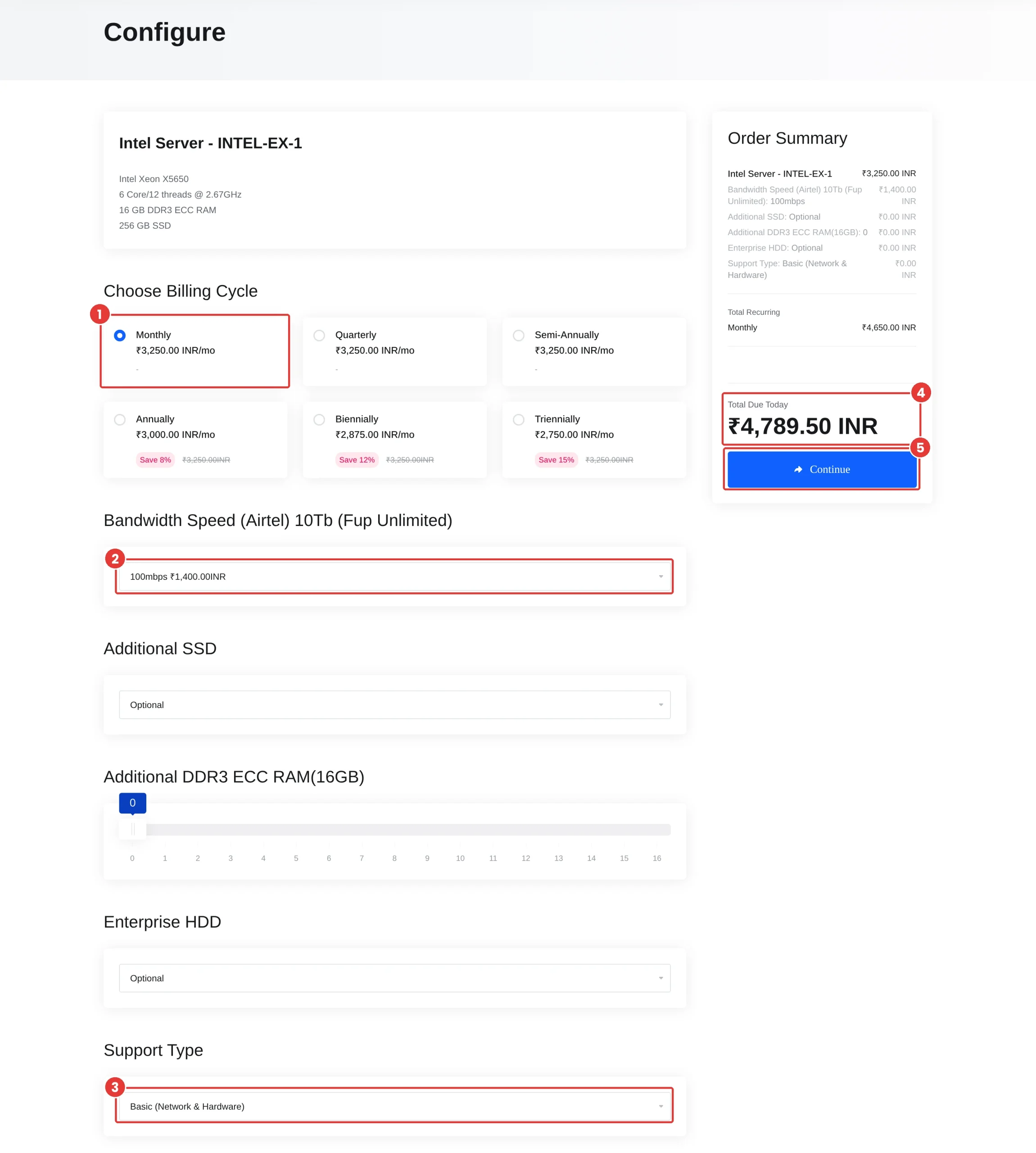
Check the drive type and size, and whether you can add more later. Intel Server starts with a 256 GB SSD. The configure page lets you add SSDs, enterprise HDDs and extra 16 GB ECC RAM sticks.
5. Port speed and fair use
Ask about the port speed and the usage policy, not just “unlimited”. Intel Server’s bandwidth option is listed as Bandwidth Speed (Airtel) 10Tb (Fup Unlimited), with 100 Mbps as the starting port and faster ports up to 1 Gbps as options.
6. Support level
Know who fixes what. ShoHost’s configure page offers Basic (Network & Hardware) support by default, with Managed and Managed + Monitoring as paid upgrades. On Basic, you look after the operating system and software.
7. The real monthly total
Compare the amount you’ll actually pay each month with your chosen options, not the smallest number on the page. The cart’s Total Due line is the figure to compare.
After handover, confirm you got what you paid for. Run these on the server:
lscpu | grep -E 'Model name|^CPU\(s\)'
free -h
lsblk -d -o NAME,SIZE,ROTA,MODEL
Expected result: the model name line shows the Xeon you ordered, CPU(s) shows the thread count, free -h shows about 16 GB of total memory on the base plan, and lsblk lists your SSD (ROTA 0 means a solid-state drive).
ShoHost Intel Server: specs and price in India
Here’s what ShoHost’s root store lists for the Intel Server group, checked on 27 Oct 2026:
| Item | INTEL-EX-1 |
|---|---|
| Processor | Intel Xeon X5650, 6 cores / 12 threads @ 2.67GHz (single processor) |
| Memory | 16 GB DDR3 ECC RAM |
| Storage | 256 GB SSD |
| Location | India |
| IP | Residential IP |
| Bandwidth | Airtel, 10 TB (FUP unlimited), 100 Mbps port to start |
| Support | Basic (Network & Hardware); Managed options available |
| Monthly total | ₹4,789.50, all fees included (100 Mbps port, Basic support) |
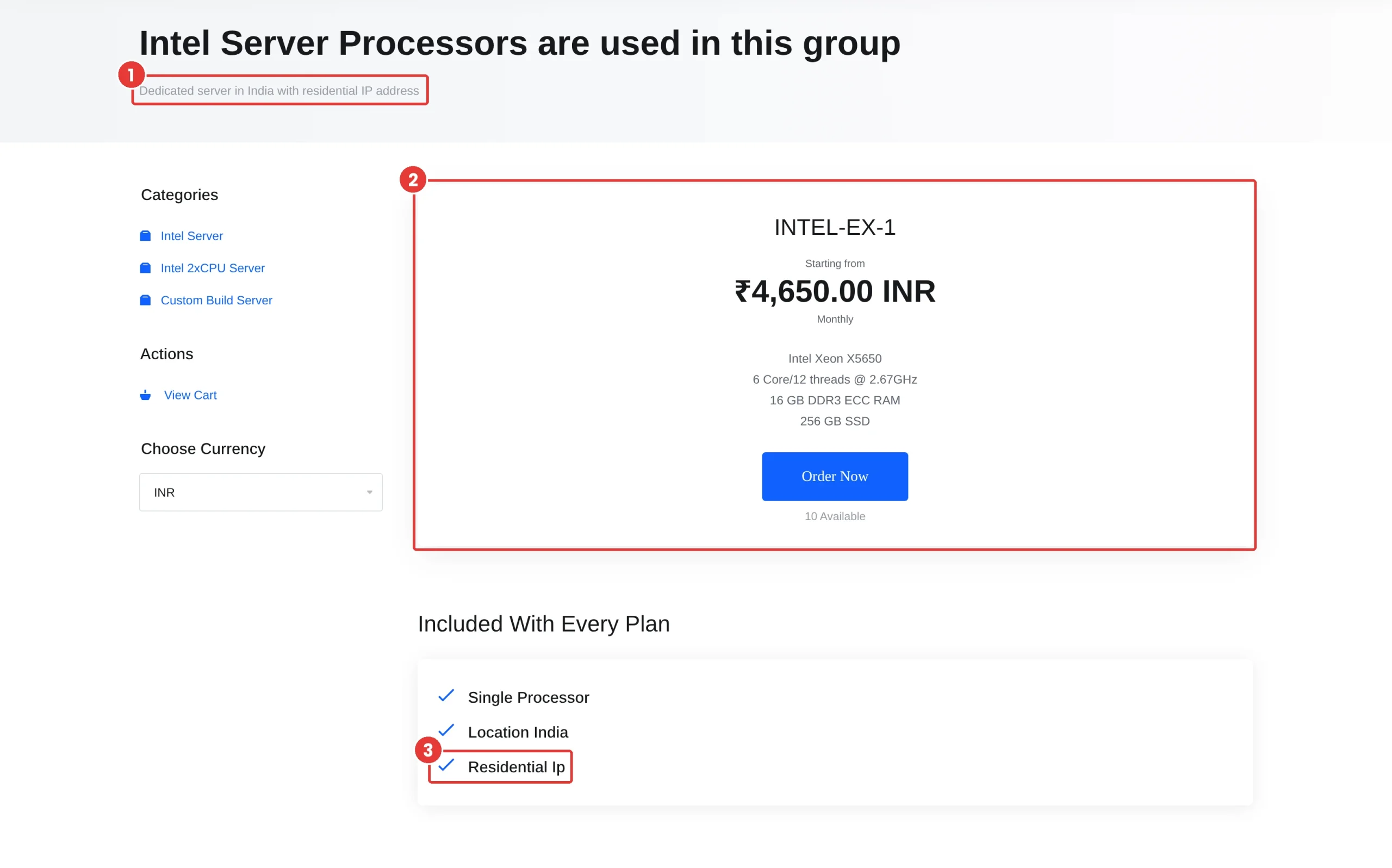
Paying for a longer term lowers the server price: the store shows 8% off annually, 12% off for two years and 15% off for three years. The store also has a USD currency switch for buyers outside India.
How to order the ShoHost Intel Server
- Open the Intel Server store, make sure Choose Currency shows INR, and click Order Now on INTEL-EX-1.
- On the configure page, pick a billing cycle and a Bandwidth Speed (Airtel) port. Add SSD, HDD, RAM or managed support only if you need them. The Order Summary on the right updates as you go.
- Click Continue and check Total Due Today in the cart before you check out.
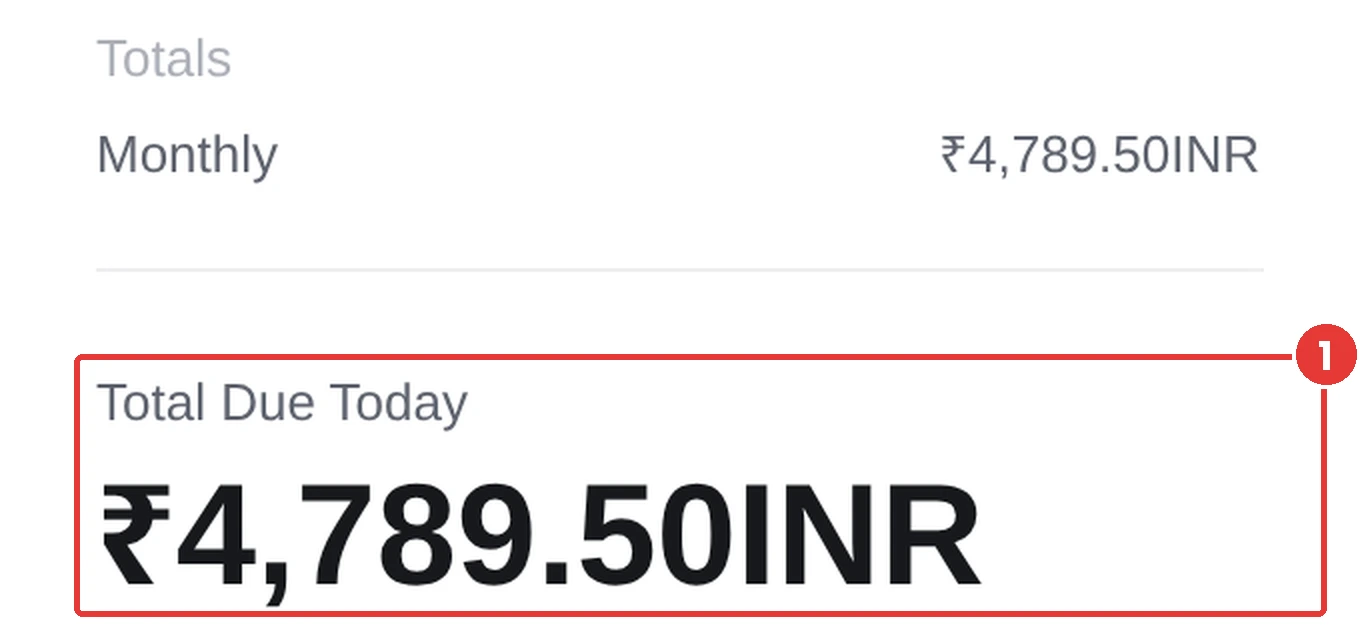
Expected result: with Monthly billing, the 100 Mbps port and Basic support, Total Due Today reads ₹4,789.50. The store showed 10 servers available when we checked.
Frequently asked questions
What is a residential IP address?
It’s an IP address registered to a consumer internet provider, the kind a home broadband line gets. Websites usually trust it more than an address registered to a hosting or cloud company.
How do I check if an IP is residential or datacenter?
Look up the network that owns it. Run curl -s https://ipinfo.io/YOUR_IP/org (or use any IP lookup site). A hosting company name means datacenter. A broadband provider’s name means residential.
Is a residential IP better than a datacenter IP?
Only for jobs where sites treat server addresses differently, like platform logins, ad checks and local price or rank checks. For websites, APIs, email and databases, a datacenter IP is the better and cheaper choice.
What is the price of a dedicated server in India?
ShoHost’s Intel Server (Xeon X5650, 16 GB ECC RAM, 256 GB SSD, residential IP) is ₹4,789.50 a month, all fees included, with a 100 Mbps port. Longer terms lower the server price by up to 15%.
What’s the difference between a dedicated IP and a dedicated server?
A dedicated IP is just an address that only you use. A dedicated server is a whole physical machine. ShoHost’s Intel Server is a dedicated server, and the store lists a residential IP with every Intel Server plan.
Related guides
- When to move from shared hosting to a KVM virtual dedicated server
- Run MetaTrader 4/5 24/7 on a Windows RDP
- A record vs nameservers: point your domain to a server
- Back up and restore your cPanel account
Not sure a residential IP fits your job? Email support@shohost.com or WhatsApp ShoHost on +91 94880 91432 (9 AM to 12 midnight IST) and tell us what the server will run. ShoHost is based in Erode, Tamil Nadu, with 180+ clients and 98.5% uptime. When you’re ready, order the Intel Server and get a dedicated machine in India with a residential IP.